
Microsoft Word
Microsoft Word is Microsoft's word processor and part of Microsoft 365. This page explains who it suits and how to get it on Windows.
289.2 MB
Canon MF Toolbox is a free Windows utility for scanning documents and photos on Canon MF series multifunction printers and sending the results to a folder, e-mail or app.
Average 0.0 · ratings: 0
Thank you! Your rating is saved; you can change it. Could not save the rating. Please try again later. Too many ratings from your network today. Please try again tomorrow. The average appears after 5 ratings.
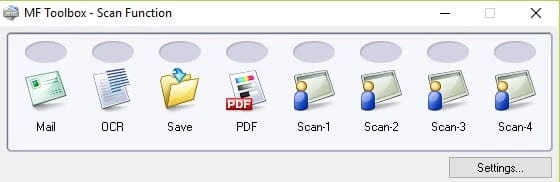
Canon MF Toolbox 4.9.1.1.mf18 is a free Windows utility from Canon for scanning on MF series multifunction printers. You download Canon MF Toolbox when your office device prints and copies fine but you want one-click scanning to a PDF, an image, an e-mail or a shared folder from the PC.
| Parameter | Value |
|---|---|
| Program | Canon MF Toolbox |
| Version | 4.9.1.1.mf18 |
| Developer | Canon |
| Platform | Windows |
| Licence | Freeware |
| Size | about 9.47 MB, according to catalogue data |
| Purpose | scanning on Canon MF devices |
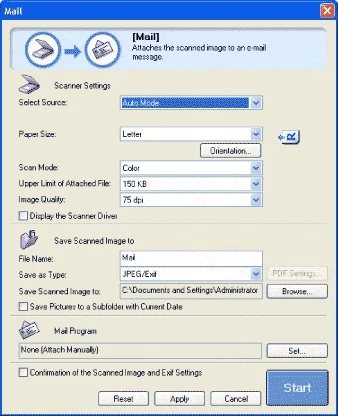
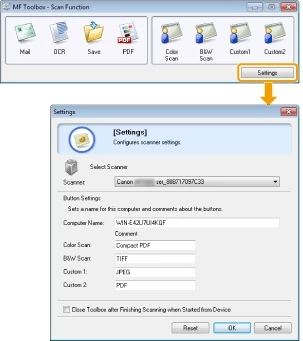
Canon's MF multifunction printers, sold as imageCLASS or i-SENSYS depending on the region, combine a printer, a scanner and often a fax. The printer part works through the standard driver, but scanning needs extra software, and MF Toolbox is the classic answer. It opens a small panel with large buttons such as Mail, Save, PDF, OCR and Custom. Each button stores its own settings: colour mode, resolution, file type and destination. Once configured, you put a page on the glass or in the feeder, press the button and the file lands where you wanted it, without going through a generic Windows scanning dialog every time. That makes the program handy in small offices where the same kinds of documents are digitised all day, such as invoices, signed contracts or ID copies. Newer Canon models use MF Scan Utility instead, so check which tool Canon offers for your exact model.
Canon's system requirements page for the driver lists the following:
See the full list on the Canon UK requirements page.
For text documents, grey scale and a moderate resolution give clean, light files; colour and high resolution are only needed for photos. If the program does not see the scanner, reinstall the driver for your exact model and check that the device is not in sleep mode. Download Canon software only from Canon's own support site: driver bundles from random pages are a common way to spread adware.
For working with scanned files, our site also lists PDFCreator and PDF Candy Desktop for assembling PDFs, ILovePDF for compressing and converting them, and Adobe PDF Reader for viewing.
Microsoft Word is Microsoft's word processor and part of Microsoft 365. This page explains who it suits and how to get it on Windows.

Microsoft Office 2010 is an office suite for Windows released in 2010; Microsoft ended its support on 13 October 2020 and recommends Microsoft 365.

Microsoft Office 2019 is a one-time purchase edition of Microsoft's office suite for Windows 10 and macOS, released in September 2018.

Adobe Reader XI (11) is an older version of Adobe's free PDF viewer for Windows; its support ended in October 2017 and Adobe Acrobat Reader is the successor.

Adobe Acrobat Reader is Adobe's free Windows application for opening, reading, printing and commenting on PDF documents.

iLovePDF Desktop is the Windows app of the iLovePDF service: merge, split, compress, convert and edit PDF files on your PC without uploading them.

Microsoft Excel is Microsoft's spreadsheet program for calculations, tables and data analysis. Build 16.0.19725.20152 is a current Windows release.

Microsoft Office 2007 is a Windows office suite released in 2007; its support ended on 10 October 2017, and Microsoft recommends Microsoft 365.